 by
by Introduction
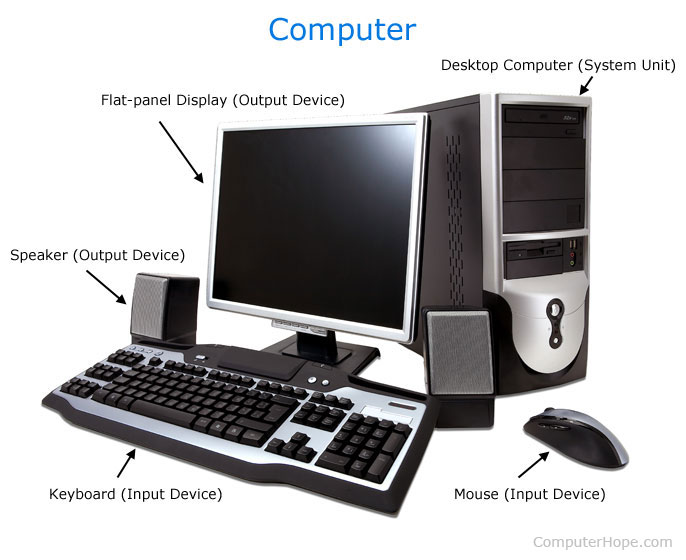
A computer is an electronic device that accepts data as input, processes it according to instructions, stores it, and produces useful information as output. Computers have become an essential part of modern life and are used in homes, schools, offices, hospitals, banks, and industries worldwide.
From simple calculations to complex scientific research, computers help people perform tasks quickly, accurately, and efficiently. Today, computers are used for communication, education, entertainment, business, and technological innovation.
Definition of a Computer
A computer is a programmable machine that can:
- Accept data (Input)
- Process data
- Store data and information
- Produce output
- Perform calculations and logical operations
The word computer comes from the word “compute,” which means “to calculate.”
History of Computers
The evolution of computers has gone through several stages.
1. First Generation (1940–1956)
- Used vacuum tubes.
- Very large and expensive.
- Consumed a lot of electricity.
- Example: ENIAC.
2. Second Generation (1956–1963)
- Used transistors instead of vacuum tubes.
- Faster and more reliable.
- Smaller in size.
3. Third Generation (1964–1971)
- Used integrated circuits (ICs).
- Increased speed and efficiency.
- Reduced cost and size.
4. Fourth Generation (1971–Present)
- Introduced microprocessors.
- Personal computers became common.
- Improved storage and performance.
5. Fifth Generation (Present and Future)
- Based on Artificial Intelligence (AI).
- Includes machine learning and robotics.
- Focuses on intelligent systems.
How Does a Computer Work?
A computer works through four basic steps:
Step 1: Input
Input refers to the data entered into the computer.
Examples:
- Keyboard
- Mouse
- Scanner
- Microphone
- Webcam
Step 2: Processing
The Central Processing Unit (CPU) processes the data according to instructions.

Step 3: Storage
The processed data is stored for future use.
Examples:
- Hard Disk Drive (HDD)
- Solid State Drive (SSD)
- USB Flash Drive
Step 4: Output
The final result is displayed through output devices.
Examples:
- Monitor
- Printer
- Speakers
- Projector
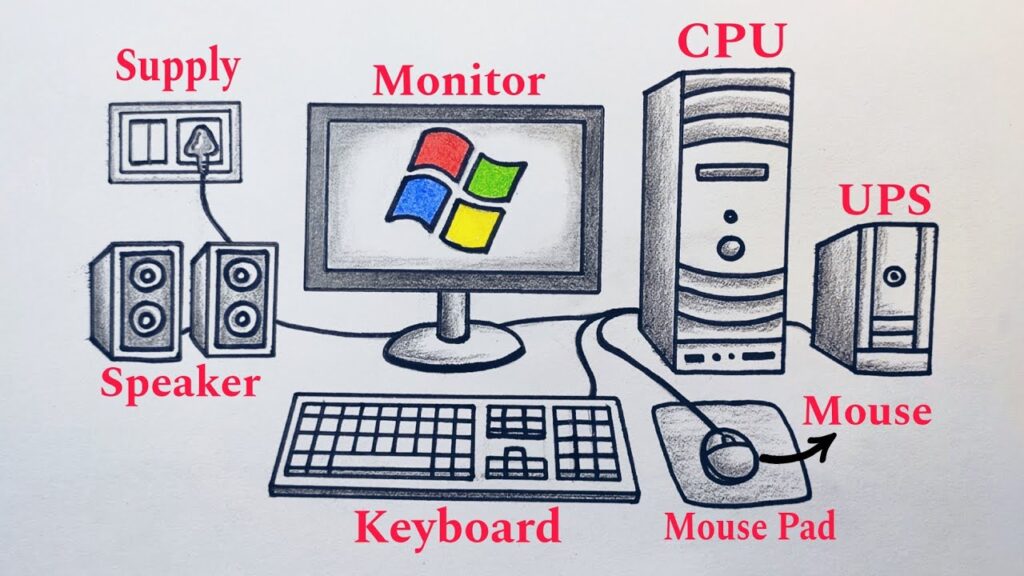
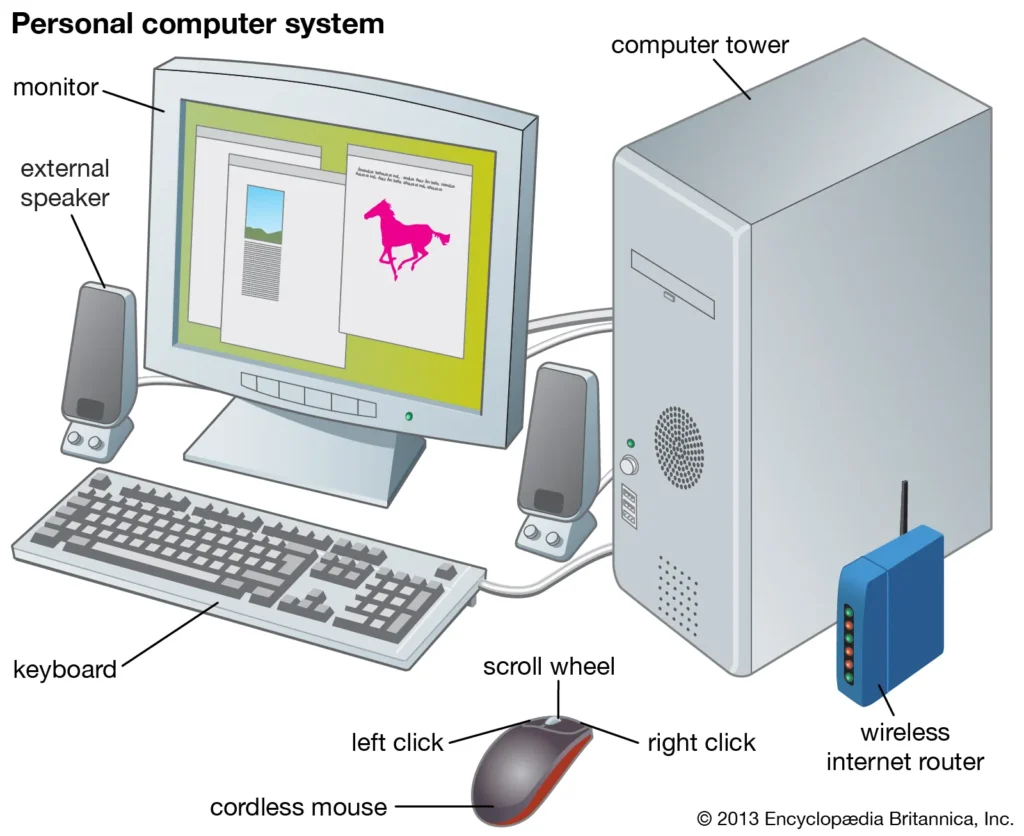
Main Components of a Computer
| Component | Function |
|---|---|
| CPU | Processes data and instructions |
| RAM | Temporary memory for active tasks |
| Storage Device | Stores files and programs |
| Motherboard | Connects all hardware components |
| Monitor | Displays information |
| Keyboard | Used for typing input |
| Mouse | Controls cursor movement |
| Power Supply | Provides electrical power |
Types of Computers
1. Desktop Computer
A desktop computer is designed for use at a fixed location such as an office or home.
Advantages:
- Powerful performance
- Easy upgrades
- Larger screen
2. Laptop Computer
A laptop is a portable computer with a built-in battery.
Advantages:
- Portable
- Lightweight
- Battery-powered
3. Tablet
A tablet uses a touchscreen interface and is smaller than a laptop.
4. Smartphone
Modern smartphones are powerful mini-computers capable of running applications, browsing the internet, and performing various tasks.
5. Supercomputer
Supercomputers are the fastest and most powerful computers in the world.
Uses:
- Weather forecasting
- Scientific research
- Space exploration
- Artificial intelligence
Advantages of Computers
1. Speed
Computers perform millions of calculations in seconds.
2. Accuracy
They provide highly accurate results when programmed correctly.
3. Storage Capacity
Large amounts of data can be stored and retrieved easily.
4. Automation
Computers can automate repetitive tasks.
5. Communication
They enable email, video calls, social media, and instant messaging.
6. Education
Students can access online courses, research materials, and educational software.
Uses of Computers
Education
- Online learning
- Research
- Virtual classrooms
Business
- Accounting
- Inventory management
- Data analysis
Healthcare
- Patient records
- Medical imaging
- Hospital management
Banking
- Online banking
- ATM services
- Financial transactions
Entertainment
- Gaming
- Movies
- Music streaming
Science and Engineering
- Simulations
- Research projects
- Space missions
Basic Computer Software
Software is a set of instructions that tells the computer what to do.
System Software
Examples:
- Microsoft Windows
- macOS
- Linux
Application Software
Examples:
- Microsoft Word
- Excel
- PowerPoint
- Google Chrome
- Adobe Photoshop
Computer Hardware vs Software
| Hardware | Software |
|---|---|
| Physical components | Programs and applications |
| Can be touched | Cannot be touched |
| Examples: Keyboard, Monitor | Examples: Windows, Chrome |
| Manufactured | Developed by programmers |
Importance of Computers in Modern Life
Today, computers are involved in almost every aspect of daily life. Businesses use them to manage operations, students use them for learning, and governments use them for administration and public services.
The growth of technologies such as Artificial Intelligence, Cloud Computing, Cybersecurity, and Data Science has further increased the importance of computers in society.
Future of Computers
The future of computers looks promising with advancements in:
- Artificial Intelligence (AI)
- Quantum Computing
- Robotics
- Virtual Reality (VR)
- Augmented Reality (AR)
- Cloud Computing
- Internet of Things (IoT)
These technologies will make computers smarter, faster, and more capable than ever before.
Conclusion
A computer is one of the most important inventions in human history. It is an electronic device that processes data, stores information, and helps users perform a wide variety of tasks efficiently. From education and healthcare to business and entertainment, computers have transformed the way people live and work. As technology continues to evolve, computers will play an even greater role in shaping the future of our world.